Trying to automate every invoice can waste more time and money than it saves. The smartest teams focus on automating the majority of invoices and handle rare exceptions manually, keeping workflows efficient and budgets under control.
Picture a finance team in Brussels staring at a stalled payment queue on a Friday afternoon: a vendor invoice that arrived in the wrong format, a manager unreachable for approval, and a late fee clock already running.
Multiply that one stuck invoice by the dozens of odd exceptions a growing business collects, and the cost of chasing perfection becomes clear.
Invoice automation promises to reduce manual data entry, speed up approval workflows, and help accounts payable teams handle growing invoice volumes, which is exactly why so many businesses in Brussels turn to automated invoice processing to improve efficiency and cut processing costs. Yet that same push for full automation often introduces a new problem: the harder a system works to cover every rare case, the more fragile it becomes.
Automating every single invoice, including rare exceptions, can drain resources and distract from improving the core workflow that handles most of your volume. Rather than concentrating effort where it pays off, teams end up chasing edge cases that surface only a handful of times a year.
The fix is a deliberate balance: automate where volume and consistency justify it, and build a clear, repeatable process for handling exceptions by hand. That way the team captures the real gains of automation without burning time and budget on the last few percent of invoices that never quite fit the template.

Why automating every exception can backfire
Most automation efforts start with a simple hope: automate enough of the process and manual work disappears on its own. That hope collides with reality the moment someone tries to script a rule for every exception.
Each exception—a vendor invoice in an unusual format, say, or a payment that needs special sign-off—demands its own custom rule, extra software, or manual fallback. Building automation for these rare cases often costs more in time and money than simply handling them by hand would have.
As those custom rules pile up, the accounts payable process stops getting simpler and starts getting harder to maintain. A single break can take longer to diagnose, and the team may need specialized training just to keep the system running.
The more exceptions get automated, the more brittle the whole workflow becomes. The moment a new, unanticipated case appears, the team is scrambling to patch it under deadline pressure, and that scramble tends to produce more errors, not fewer.
The real value of automated invoice processing
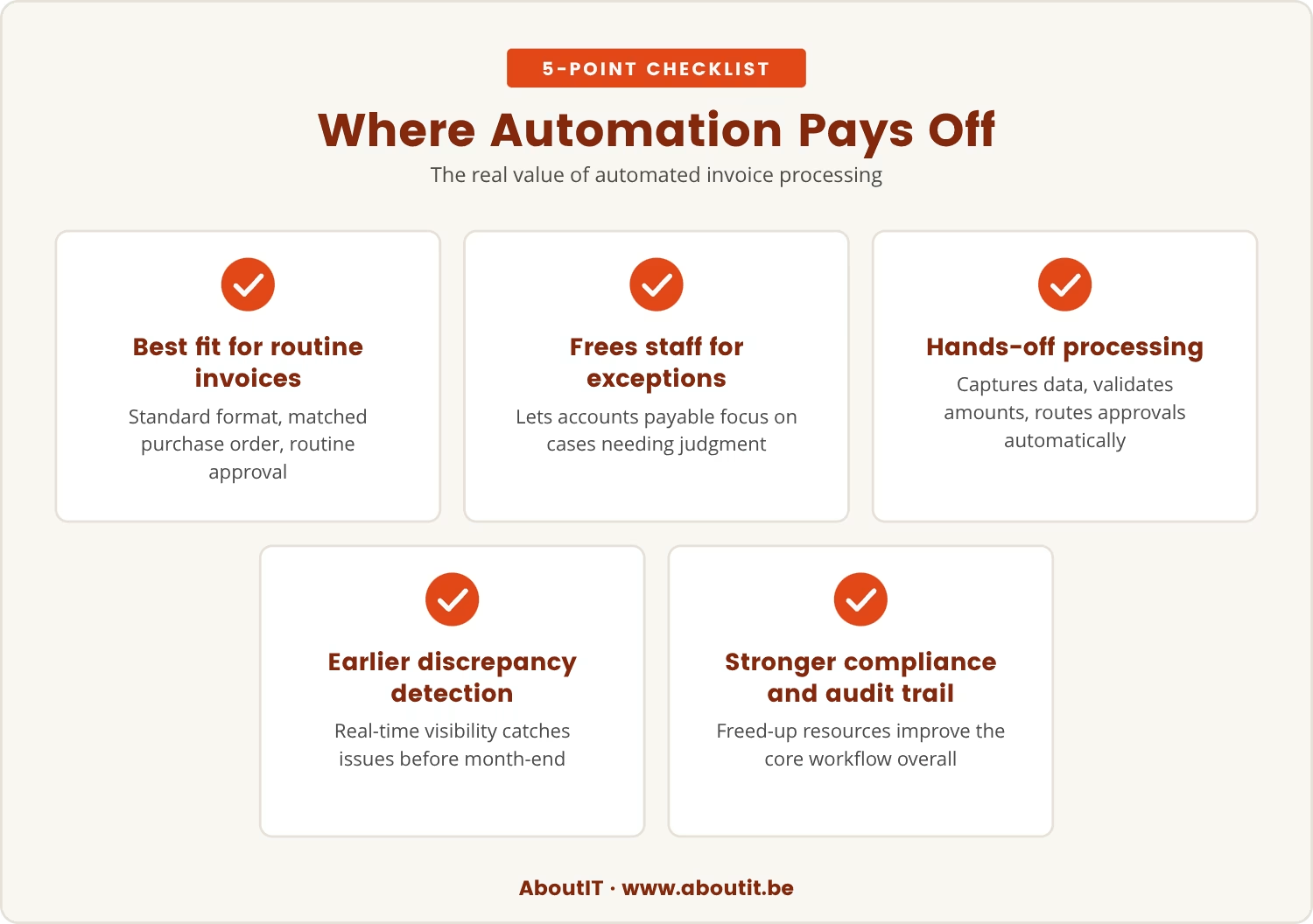
Automated invoice processing earns its keep on the invoices that look alike: standard format, matched purchase order, routine approval. Since most invoices follow exactly that predictable pattern, this is where automation has the most to offer.
Pointing automation at that high-volume, low-complexity segment frees accounts payable staff to spend their attention on the exceptions that actually need judgment. The workflow stays simple precisely because it isn't being asked to cover every possible case.
Within that core, automated systems capture invoice data, validate amounts, and route approvals without anyone touching a keyboard, cutting manual data entry and speeding up payment execution. The payoff shows up as real-time visibility into invoice status, so discrepancies get caught sooner rather than at month-end.
Once the chase for the last few exceptions stops, those freed-up resources can go toward strengthening the main workflow instead. That shift tends to show up as better compliance, a stronger audit trail, and measurably fewer headaches for AP staff.
Invoice automation in Brussels: Local context matters
Brussels businesses operate under their own regulatory and compliance requirements, and local tax rules, document formats, and language differences all leave their mark on how invoices move through the process.
Attempting to automate every exception inside that layered environment escalates fast. It works better to automate the standard cases that make up the bulk of invoice volume and set clear, explicit guidelines for handling the rest manually.
That combination keeps the process compliant with local regulations while keeping accounts payable automation manageable instead of sprawling.
When manual processing is the smarter choice
Some invoices simply resist standardization. A supplier might send a handwritten PDF, or a payment might need urgent sign-off from a manager who's out of the office — and in moments like these, manual processing is often faster and less risky than engineering a custom automation rule for a one-off case.
Manual intervention lets someone apply judgment: spotting an error, asking a clarifying question, resolving an issue before it snowballs. That flexibility matters most for high-value or sensitive payments, where a wrong automated assumption is expensive.
Accepting that a small share of invoices will always need a human hand prevents the workflow from becoming overengineered. The team can focus on what it does best, and the automation that remains stays dependable because it isn't stretched past its strengths.
Key benefits of balancing automation and manual work
Striking that balance delivers several concrete advantages:
- Efficiency: Automate the majority of invoices to speed up processing and reduce manual data entry.
- Simplicity: Keep the workflow straightforward by handling exceptions manually instead of building complex rules.
- Cost control: Avoid spending extra budget automating rare cases that don't justify the investment.
- Flexibility: Give the team the ability to handle unique or urgent invoices without waiting for IT changes.
- Reliability: Reduce the risk of system failures by keeping automation focused on standard cases.
How to decide what to automate in your accounts payable workflow
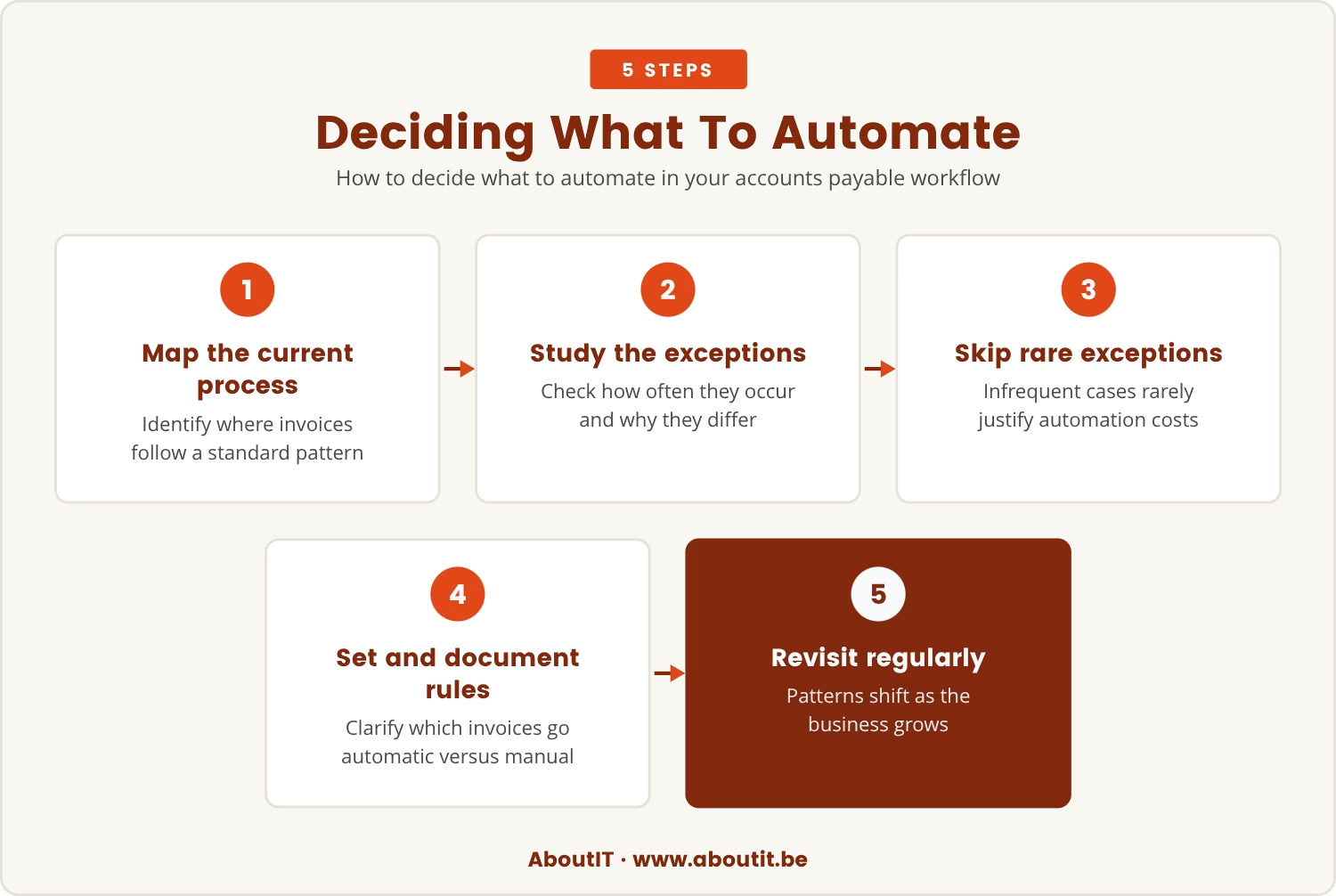
Deciding what belongs in automation starts with mapping the current process end to end and marking where invoices consistently follow a standard pattern.
From there, turn to the exceptions themselves: how often do they occur, and what actually makes them different? An exception that surfaces only a few times a year rarely justifies the engineering cost of automating it.
With that picture in hand, set explicit rules for which invoices run automatically and which route to manual handling, and document those rules so the whole team knows what to expect. Because patterns shift as a business grows, the workflow is worth revisiting on a regular schedule.
Whatever invoice automation software gets chosen, it should allow easy manual intervention when a case calls for it — the system needs to work for the team, not the reverse.
Streamlining your AP process: Practical steps for improvement
Improving accounts payable doesn't require automating everything; these practical steps matter more than total coverage.
Identify your high-volume invoice types
Start by finding the invoice formats and vendors that make up most of your volume. These are the best candidates for automation.
Standardize your approval workflow
Create clear approval rules for routine invoices. This reduces delays and makes automation easier to manage.
Use OCR and data validation tools
Optical character recognition (OCR) can help capture invoice data, but always check for errors. Data validation ensures accuracy before payment.
Set up a manual exception process
Define how the team will handle invoices that don't fit the standard workflow, and make sure everyone knows the process.
Monitor and adjust regularly
Track results and review the workflow often, since needs tend to shift as the business grows.
The bottom line: Focus on what matters most
Chasing full automation for every invoice pulls attention away from improving the core workflow that actually drives the business. Letting a defined share of exceptions stay manual keeps the process efficient, flexible, and reliable instead.
The best results come from automating what genuinely makes sense and handling everything else with clear, simple manual steps — an approach that saves time, controls costs, and keeps the accounts payable team focused on what matters most.

A smarter way to approach AP automation
Many businesses with 5 to 40 users find themselves stuck between wanting full automation and dealing with the reality of exceptions. At AboutIT, we understand how frustrating it can be to balance efficiency with flexibility.
If you're ready to rethink your approach, let's talk about how AboutIT helps teams like yours streamline accounts payable without overcomplicating your workflow.
Want to test your setup for hidden risks?
Get a Free Cyber Test (normally up to €5000) to check your systems for vulnerabilities—available to qualifying businesses ready to improve their processes.
Frequently asked questions
How do I know which invoices should be automated and which should stay manual?
Review invoice volumes to find the types that arrive most often in a standard format, since these are usually the strongest candidates for automation. Invoices that need special handling, come from new suppliers, or show unusual formats tend to work better handled manually, and it's worth checking periodically whether these patterns have shifted.
Will leaving some invoices manual slow down the accounts payable process?
Not necessarily. Automating the bulk of invoices lets most payments move quickly, and handling exceptions by hand can actually speed things up overall by avoiding the cost of building complex rules for rare cases. The result is an efficient workflow with fewer bottlenecks.
What are the risks of automating every exception in invoice processing?
Automating every exception tends to produce a fragile system that's difficult to maintain, and when a new exception appears, the team can end up spending more time troubleshooting than processing invoices. That dynamic brings delays, errors, and higher costs, which is why rare cases are often safer handled manually.
How does invoice automation software handle compliance and audit requirements?
Most invoice automation software tracks approvals, maintains an audit trail, and supports compliance with local regulations. Manual review still matters for exceptions or high-value payments, and pairing automation with manual checks is what keeps a business compliant and audit-ready.
Can automation solutions work with existing accounting systems like QuickBooks Online?
Yes, many automation solutions are built to sync with popular accounting systems, including QuickBooks Online. That integration smooths data transfer, cuts manual data entry, and helps keep records accurate, though compatibility is worth confirming before choosing a solution.